
Welcome!
By registering with us, you'll be able to discuss, share and private message with other members of our community.
SignUp Now!Вы используете устаревший браузер. Этот и другие сайты могут отображаться в нём некорректно.
Вам необходимо обновить браузер или попробовать использовать другой.
Вам необходимо обновить браузер или попробовать использовать другой.
Решено Как сделать также
- Автор темы Yaroslav.
- Дата начала
- Статус
- В этой теме нельзя размещать новые ответы.

Решение

Используйте этот код для виджета "меню быстрого доступа", он берет цвета из палитры стиляПосмотреть вложение 28174Посмотреть вложение 28175
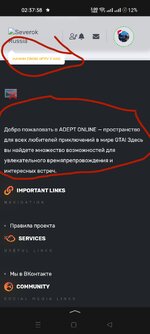
Я хочу сделать так чтобы все что я отправил, там где было черно, хочу чтобы был белый, а то как то не гармонично смотреться
HTML:
<div class="block quick-access" {{ widget_data($widget) }}>
    <div class="block-container" style="border-radius: 12px; overflow: hidden; background: {{ property('contentBg') }}; border: 1px solid {{ property('borderColor') }}; box-shadow: 0 8px 32px rgba(0, 0, 0, 0.18);">
        <h3 class="block-minorHeader" style="background: {{ property('contentBg') }}; color: {{ property('textColor') }}; padding: 15px 20px; margin: 0; font-family: 'Segoe UI', system-ui, sans-serif; font-weight: 600...
- Июл
- 147
- 91
Пользователь
@Yaroslav., в настройках стиля

- Ноя
- 2,161
- 8,148
Команда форума
Администратор
Установите их стиль и будет у вас так же на форумеПосмотреть вложение 28149
Парни, помогите то что я выделил карандашом. Как это сделать, на своем форуме. И там где текст был фон свой
- Май
- 26
- 1
Пользователь
У меня от них и стоит как раз стильУстановите их стиль и будет у вас так же на форуме
- Ноя
- 2,161
- 8,148
Команда форума
Администратор
Надпись под лого:Посмотреть вложение 28149
Парни, помогите то что я выделил карандашом. Как это сделать, на своем форуме. И там где текст был фон свой
Панель управления - Внешний вид - Настройки стиля - ( Nexxe ) Header - Logo Slogan - Text
Текст в футере "о нас":
Панель управления - Внешний вид - Настройки стиля - ( Nexxe ) Footer - (Footer) (About Us) content
- Май
- 26
- 1
Пользователь
Это я понял, ток я хочу сейчас покажуНадпись под лого:
Панель управления - Внешний вид - Настройки стиля - ( Nexxe ) Header - Logo Slogan - Text
Текст в футере "о нас":
Панель управления - Внешний вид - Настройки стиля - ( Nexxe ) Footer - (Footer) (About Us) content
- Май
- 26
- 1
Пользователь
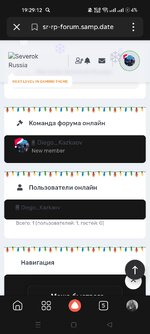
Я хочу сделать так чтобы все что я отправил, там где было черно, хочу чтобы был белый, а то как то не гармонично смотреться
- Ноя
- 2,161
- 8,148
Команда форума
Администратор
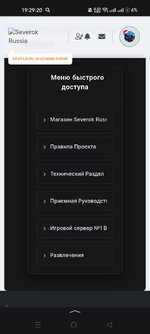
Используйте этот код для виджета "меню быстрого доступа", он берет цвета из палитры стиляПосмотреть вложение 28174Посмотреть вложение 28175
Я хочу сделать так чтобы все что я отправил, там где было черно, хочу чтобы был белый, а то как то не гармонично смотреться
HTML:
<div class="block quick-access" {{ widget_data($widget) }}>
    <div class="block-container" style="border-radius: 12px; overflow: hidden; background: {{ property('contentBg') }}; border: 1px solid {{ property('borderColor') }}; box-shadow: 0 8px 32px rgba(0, 0, 0, 0.18);">
        <h3 class="block-minorHeader" style="background: {{ property('contentBg') }}; color: {{ property('textColor') }}; padding: 15px 20px; margin: 0; font-family: 'Segoe UI', system-ui, sans-serif; font-weight: 600; font-size: 16px; text-align: center; letter-spacing: 0.5px; border-bottom: 1px solid {{ property('borderColor') }};">
            Меню быстрого доступа
        </h3>

        <div class="block-body block-row" style="padding: 20px;">
            <style>
                @import url('https://fonts.googleapis.com/css2?family=Inter:wght@400;500;600&display=swap');

                .quick-access {
                    font-family: 'Inter', 'Segoe UI', system-ui, sans-serif;
                }

                .quick-access hr {
                    border: none;
                    height: 1px;
                    background: {{ property('borderColorLight') }};
                    margin: 8px 0;
                }

                .quick-access .button {
                    padding: 0 16px;
                    width: 100%;
                    height: 48px;
                    display: inline-flex;
                    align-items: center;
                    justify-content: flex-start;
                    text-decoration: none;
                    cursor: pointer;
                    border: 1px solid {{ property('borderColor') }};
                    white-space: nowrap;
                    transition: all 0.4s cubic-bezier(0.25, 0.46, 0.45, 0.94);
                    font-size: 13px;
                    border-radius: 8px;
                    font-weight: 500;
                    text-align: left;
                    letter-spacing: 0.2px;
                    box-shadow: 0 2px 8px rgba(0, 0, 0, 0.12);
                    color: {{ property('textColorDimmed') }};
                    background: {{ property('contentBg') }};
                    font-family: 'Inter', 'Segoe UI', system-ui, sans-serif;
                    position: relative;
                    overflow: hidden;
                }

                .quick-access .button::before {
                    content: '';
                    position: absolute;
                    top: 0;
                    left: -100%;
                    width: 100%;
                    height: 100%;
                    background: linear-gradient(90deg, transparent, {{ parse_less_color('fade(' . property('paletteColor3') . ', 8%)') }}, transparent);
                    transition: left 0.6s ease;
                }

                .quick-access .button:hover::before {
                    left: 100%;
                }

                .quick-access .button:hover {
                    background: {{ property('pageBg') }};
                    transform: translateY(-2px);
                    box-shadow: 0 6px 20px rgba(0, 0, 0, 0.18);
                    border-color: {{ property('linkHoverColor') }};
                    color: {{ property('linkHoverColor') }};
                }

                .quick-access .button:active {
                    transform: translateY(0);
                    box-shadow: 0 2px 10px rgba(0, 0, 0, 0.15);
                }

                .quick-access .button-text {
                    position: relative;
                    z-index: 2;
                    display: flex;
                    align-items: center;
                    gap: 10px;
                    font-family: 'Inter', 'Segoe UI', system-ui, sans-serif;
                    font-size: 13px;
                    font-weight: 500;
                    white-space: nowrap;
                    overflow: hidden;
                    text-overflow: ellipsis;
                    width: 100%;
                }

                .quick-access .button-text::before {
                    content: '›';
                    font-size: 16px;
                    opacity: 0.7;
                    transition: transform 0.3s ease;
                    flex-shrink: 0;
                }

                .quick-access .button:hover .button-text::before {
                    transform: translateX(3px);
                    opacity: 1;
                }

                .listPlain.quick-access {
                    margin: 0;
                    padding: 0;
                    list-style: none;
                }

                .listPlain.quick-access li {
                    margin: 0;
                    padding: 0;
                }

                .quick-access .button:last-child .button-text {
                    font-size: 12.5px;
                    letter-spacing: 0.1px;
                }

                .p-body-sidebar .block-row {
                    background: {{ property('contentBg') }};
                    border-radius: 8px;
                    margin-top: 6px;
                }
            </style>

            <ol class="listPlain quick-access">
                <li><a href="https://forum.crmp.online/index.php?forums/Новости-и-Информация.4/" class="button"><span class="button-text">Новости и информация</span></a></li>
                <hr>
                <li><a href="https://forum.crmp.online/index.php?forums/Правила-проекта.7/" class="button"><span class="button-text">Правила Проекта</span></a></li>
                <hr>
                <li><a href="https://forum.crmp.online/index.php?forums/Технический-раздел.5/" class="button"><span class="button-text">Технический Раздел</span></a></li>
                <hr>
                <li><a href="https://forum.crmp.online/index.php?forums/Приемная-Руководства.8/" class="button"><span class="button-text">Приемная Руководства</span></a></li>
                <hr>
                <li><a href="https://forum.crmp.online/index.php?forums/Игровой-сервер-№1-black-bonus.10/" class="button"><span class="button-text">Игровой сервер №1 Black Bonus</span></a></li>
                <hr>
                <li><a href="https://forum.crmp.online/index.php?forums/Игровой-сервер-№2-Суета-РП.46/" class="button"><span class="button-text">Игровой сервер №2 Суета РП</span></a></li>
                <hr>
                <li><a href="https://forum.crmp.online/index.php?forums/Игровой-сервер-№3-hassle-bonus.66/" class="button"><span class="button-text">Игровой сервер №3 Hassle Bonus</span></a></li>
                <hr>
                <li><a href="https://forum.crmp.online/index.php?forums/Игровой-сервер-№4-grand-bonus.86/" class="button"><span class="button-text">Игровой сервер №4 Grand Bonus</span></a></li>
                <hr>
                <li><a href="https://forum.crmp.online/index.php#razvlechenija.14" class="button"><span class="button-text">Развлечения</span></a></li>
            </ol>
        </div>
    </div>
</div>
Решение
- Май
- 26
- 1
Пользователь
А куда его ставить можно инструкция пожалуйстаИспользуйте этот код для виджета "меню быстрого доступа", он берет цвета из палитры стиля
HTML:<div class="block quick-access" {{ widget_data($widget) }}> <div class="block-container" style="border-radius: 12px; overflow: hidden; background: {{ property('contentBg') }}; border: 1px solid {{ property('borderColor') }}; box-shadow: 0 8px 32px rgba(0, 0, 0, 0.18);"> <h3 class="block-minorHeader" style="background: {{ property('contentBg') }}; color: {{ property('textColor') }}; padding: 15px 20px; margin: 0; font-family: 'Segoe UI', system-ui, sans-serif; font-weight: 600; font-size: 16px; text-align: center; letter-spacing: 0.5px; border-bottom: 1px solid {{ property('borderColor') }};"> Меню быстрого доступа </h3> <div class="block-body block-row" style="padding: 20px;"> <style> @import url('https://fonts.googleapis.com/css2?family=Inter:wght@400;500;600&display=swap'); .quick-access { font-family: 'Inter', 'Segoe UI', system-ui, sans-serif; } .quick-access hr { border: none; height: 1px; background: {{ property('borderColorLight') }}; margin: 8px 0; } .quick-access .button { padding: 0 16px; width: 100%; height: 48px; display: inline-flex; align-items: center; justify-content: flex-start; text-decoration: none; cursor: pointer; border: 1px solid {{ property('borderColor') }}; white-space: nowrap; transition: all 0.4s cubic-bezier(0.25, 0.46, 0.45, 0.94); font-size: 13px; border-radius: 8px; font-weight: 500; text-align: left; letter-spacing: 0.2px; box-shadow: 0 2px 8px rgba(0, 0, 0, 0.12); color: {{ property('textColorDimmed') }}; background: {{ property('contentBg') }}; font-family: 'Inter', 'Segoe UI', system-ui, sans-serif; position: relative; overflow: hidden; } .quick-access .button::before { content: ''; position: absolute; top: 0; left: -100%; width: 100%; height: 100%; background: linear-gradient(90deg, transparent, {{ parse_less_color('fade(' . property('paletteColor3') . ', 8%)') }}, transparent); transition: left 0.6s ease; } .quick-access .button:hover::before { left: 100%; } .quick-access .button:hover { background: {{ property('pageBg') }}; transform: translateY(-2px); box-shadow: 0 6px 20px rgba(0, 0, 0, 0.18); border-color: {{ property('linkHoverColor') }}; color: {{ property('linkHoverColor') }}; } .quick-access .button:active { transform: translateY(0); box-shadow: 0 2px 10px rgba(0, 0, 0, 0.15); } .quick-access .button-text { position: relative; z-index: 2; display: flex; align-items: center; gap: 10px; font-family: 'Inter', 'Segoe UI', system-ui, sans-serif; font-size: 13px; font-weight: 500; white-space: nowrap; overflow: hidden; text-overflow: ellipsis; width: 100%; } .quick-access .button-text::before { content: '›'; font-size: 16px; opacity: 0.7; transition: transform 0.3s ease; flex-shrink: 0; } .quick-access .button:hover .button-text::before { transform: translateX(3px); opacity: 1; } .listPlain.quick-access { margin: 0; padding: 0; list-style: none; } .listPlain.quick-access li { margin: 0; padding: 0; } .quick-access .button:last-child .button-text { font-size: 12.5px; letter-spacing: 0.1px; } .p-body-sidebar .block-row { background: {{ property('contentBg') }}; border-radius: 8px; margin-top: 6px; } </style> <ol class="listPlain quick-access"> <li><a href="https://forum.crmp.online/index.php?forums/Новости-и-Информация.4/" class="button"><span class="button-text">Новости и информация</span></a></li> <hr> <li><a href="https://forum.crmp.online/index.php?forums/Правила-проекта.7/" class="button"><span class="button-text">Правила Проекта</span></a></li> <hr> <li><a href="https://forum.crmp.online/index.php?forums/Технический-раздел.5/" class="button"><span class="button-text">Технический Раздел</span></a></li> <hr> <li><a href="https://forum.crmp.online/index.php?forums/Приемная-Руководства.8/" class="button"><span class="button-text">Приемная Руководства</span></a></li> <hr> <li><a href="https://forum.crmp.online/index.php?forums/Игровой-сервер-№1-black-bonus.10/" class="button"><span class="button-text">Игровой сервер №1 Black Bonus</span></a></li> <hr> <li><a href="https://forum.crmp.online/index.php?forums/Игровой-сервер-№2-Суета-РП.46/" class="button"><span class="button-text">Игровой сервер №2 Суета РП</span></a></li> <hr> <li><a href="https://forum.crmp.online/index.php?forums/Игровой-сервер-№3-hassle-bonus.66/" class="button"><span class="button-text">Игровой сервер №3 Hassle Bonus</span></a></li> <hr> <li><a href="https://forum.crmp.online/index.php?forums/Игровой-сервер-№4-grand-bonus.86/" class="button"><span class="button-text">Игровой сервер №4 Grand Bonus</span></a></li> <hr> <li><a href="https://forum.crmp.online/index.php#razvlechenija.14" class="button"><span class="button-text">Развлечения</span></a></li> </ol> </div> </div> </div>
- Май
- 26
- 1
Пользователь
Отмена, я разобралсяА куда его ставить можно инструкция пожалуйста
- Статус
- В этой теме нельзя размещать новые ответы.