- Июл
- 36
- 9
Пользователь
Дайте пожалуйста код календаря HTML как на WIZZI MOBILE если все будет топчик дам вознаграждение
Последнее редактирование:
By registering with us, you'll be able to discuss, share and private message with other members of our community.
SignUp Now!Дай ссылку на форум ихДайте пожалуйста код календаря HTML как на WIZZI MOBILE если все будет топчик дам вознаграждение

<style>
.gift-container {
    text-align: center;
    padding: 20px;
    background: #2a2a2a;
    border-radius: 12px;
    border: 1px solid #444;
    width: 100%;
    box-sizing: border-box;
}

.tree { font-size: 28px; margin-bottom: 8px; }

.gift-title {
    color: #fff;
    font-size: 18px;
    margin-bottom: 12px;
    line-height: 1.3;
}

.gift-icon { font-size: 50px; margin: 12px 0; }

.one-time {
    color: #ff6b6b;
    font-size: 13px;
    margin-bottom: 15px;
}

.open-btn {
    background: #ff6b6b;
    border: 2px solid #ffd700;
    color: #fff;
    padding: 10px 30px;
    font-size: 16px;
    font-weight: bold;
    border-radius: 8px;
    cursor: pointer;
    text-transform: uppercase;
}

.open-btn:hover { background: #ff5252; }

.result-text {
    display: none;
    font-size: 16px;
    color: #ffd700;
    font-weight: bold;
    margin-top: 12px;
}

.result-text.show { display: block; }

.bottom-gif { margin-top: 20px; }
.bottom-gif img {
    width: 100%;
    max-width: 160px;
    height: auto;
}
</style>

<div class="gift-container">
    <div class="tree">🎄</div>
    <div class="gift-title">chtoto - CHRISTMAS GIFT</div>
    <div class="gift-icon">🎁</div>
    <div class="one-time">Только 1 раз на человека</div>
    <button class="open-btn" onclick="openGift()">ОТКРЫТЬ</button>
    <div class="result-text" id="result">.</div>

    <div class="bottom-gif">
        <img src="https://i.giphy.com/7Zy3QalQCyD9stmf39.gif">
    </div>
</div>

<script>
var giftPrizes = [
    'Вы выиграли: что-то 1',
    'Вы выиграли: что-то 2',
    'Вы выиграли: что-то 3',
    'Вы выиграли: что-то 4',
    'Вы выиграли: что-то 5',
    'Вы выиграли: что-то 6',
    'Вы выиграли: что-то 7',
    'Вы выиграли: что-то 8'
];

function openGift() {
    var button = document.querySelector('.open-btn');
    var resultDiv = document.getElementById('result');
    var randomPrize = giftPrizes[Math.floor(Math.random() * giftPrizes.length)];

    button.style.display = 'none';
    resultDiv.textContent = randomPrize;
    resultDiv.classList.add('show');
}
</script>Дай ссылку на форум их

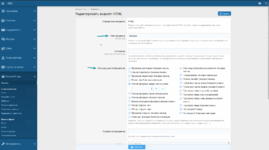
Чуть подробнее можно? Новичок просто не вижу куда ключ вставлятьПанель управления -> Внешний вид -> Виджеты -> Создать виджет
ключ виджета: newyear
позиция отображения: "Список форумов: выше списка узлов"
шаблон;
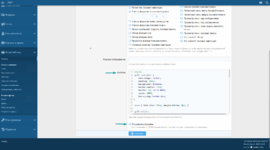
код:<style> .gift-container { text-align: center; padding: 20px; background: #2a2a2a; border-radius: 12px; border: 1px solid #444; width: 100%; box-sizing: border-box; } .tree { font-size: 28px; margin-bottom: 8px; } .gift-title { color: #fff; font-size: 18px; margin-bottom: 12px; line-height: 1.3; } .gift-icon { font-size: 50px; margin: 12px 0; } .one-time { color: #ff6b6b; font-size: 13px; margin-bottom: 15px; } .open-btn { background: #ff6b6b; border: 2px solid #ffd700; color: #fff; padding: 10px 30px; font-size: 16px; font-weight: bold; border-radius: 8px; cursor: pointer; text-transform: uppercase; } .open-btn:hover { background: #ff5252; } .result-text { display: none; font-size: 16px; color: #ffd700; font-weight: bold; margin-top: 12px; } .result-text.show { display: block; } .bottom-gif { margin-top: 20px; } .bottom-gif img { width: 100%; max-width: 160px; height: auto; } </style> <div class="gift-container"> <div class="tree">🎄</div> <div class="gift-title">chtoto - CHRISTMAS GIFT</div> <div class="gift-icon">🎁</div> <div class="one-time">Только 1 раз на человека</div> <button class="open-btn" onclick="openGift()">ОТКРЫТЬ</button> <div class="result-text" id="result">.</div> <div class="bottom-gif"> <img src="https://i.giphy.com/7Zy3QalQCyD9stmf39.gif"> </div> </div> <script> var giftPrizes = [ 'Вы выиграли: что-то 1', 'Вы выиграли: что-то 2', 'Вы выиграли: что-то 3', 'Вы выиграли: что-то 4', 'Вы выиграли: что-то 5', 'Вы выиграли: что-то 6', 'Вы выиграли: что-то 7', 'Вы выиграли: что-то 8' ]; function openGift() { var button = document.querySelector('.open-btn'); var resultDiv = document.getElementById('result'); var randomPrize = giftPrizes[Math.floor(Math.random() * giftPrizes.length)]; button.style.display = 'none'; resultDiv.textContent = randomPrize; resultDiv.classList.add('show'); } </script>
Расширенный режим: включаем
Чуть подробнее можно? Новичок просто не вижу куда ключ вставлять